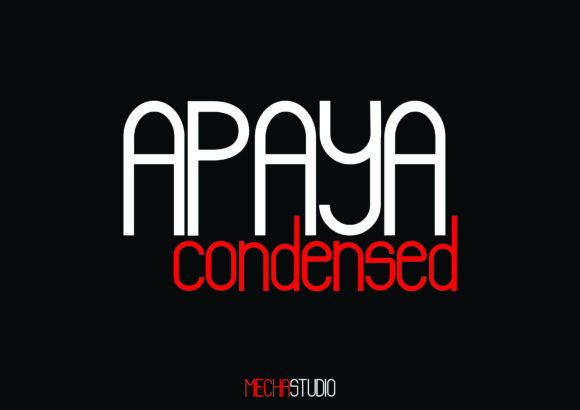
Apaya: A Modern Sans Serif Font for Web Design
I was working late one night on a new landing page for a boutique online store when I needed a fresh look for the hero section. The previous font felt too traditional, and I wanted something that would pop without overwhelming the design. That’s when I stumbled upon Apaya—a modern sans serif display font from Script Amp. As I began testing it in the layout, I realized this wasn’t just any font; it had a clean, confident edge that immediately elevated the visual tone of the site.
What Makes Apaya Stand Out
Apaya is a condensed sans serif typeface with a sleek, minimalist profile. Its sharp edges and balanced proportions give it a modern feel that works well in both digital and print formats. What caught my attention most was how it maintained readability even at smaller sizes—something that’s crucial for web design where text often needs to be legible across various screen sizes.
The font has a subtle weight variation that adds depth without being distracting. It feels professional yet approachable, which makes it ideal for a wide range of digital projects—from creative portfolios to e-commerce sites. When paired with a clean body font like Lato or Open Sans, Apaya creates a strong visual hierarchy that guides the user's eye naturally through the content.
Testing Apaya in Real Web Projects
I first used Apaya as the primary font for the headline in the hero section. Placed over a full-screen image banner, it stood out clearly without overpowering the background. The condensed style made the title more compact, allowing me to fit more text within the space while keeping the focus on the message.
Next, I tested it in the call-to-action buttons. The bold weight of Apaya gave the buttons a sense of urgency and importance, encouraging visitors to take action. On mobile screens, the font remained crisp and readable, which is essential for ensuring a good user experience across all devices.
For the navigation bar, I opted for a lighter weight of Apaya. This helped maintain a balance between visibility and subtlety, making the menu items easy to scan without drawing too much attention away from the main content.
Where Apaya Shines in Web Design
Apaya is particularly effective for short phrases and titles, such as headlines, subheadings, and feature sections. It’s not the best choice for long paragraphs of body copy, but it excels in decorative accents, logo text, and branding elements. Here are some real-world scenarios where Apaya can make an impact:
- Hero Sections: Use Apaya for bold, attention-grabbing headlines that communicate your brand’s message quickly.
- Landing Pages: Apply it to key features or selling points to create visual emphasis and guide users toward conversion actions.
- Portfolio Sites: Highlight project names or descriptions with Apaya to add a modern, professional touch.
- Product Pages: Use it for product titles and promotional banners to stand out against images or backgrounds.
- Blog Headers: Pair it with a simpler body font to create a clean, readable layout that enhances the overall reading experience.
One thing I noticed was how well Apaya performed on dark mode interfaces. The contrast between the font and the background was clear, and it didn’t lose its legibility even when the screen was dimmed. This makes it a great option for websites that offer dark mode settings.
Font Pairing and Practical Tips
When choosing a font pair for Apaya, it’s important to consider the overall mood of the design. For a more modern and minimal aesthetic, pairing it with a clean sans serif like Montserrat or Poppins works well. If you want to add a touch of elegance, a simple serif font like Merriweather or Playfair Display can complement Apaya nicely.
For accessibility, always ensure that the font size is large enough to be easily read, especially for users with visual impairments. Avoid using Apaya in areas where small text could cause confusion or difficulty in scanning. It’s also worth checking if the font includes ligatures or alternate characters, as these can enhance the typographic quality of your design.
Before implementing Apaya on a live website, verify that it supports the languages you’ll be using and that it comes with commercial licensing if you plan to use it for client projects or online stores. Script Amp offers a variety of weights and styles, so you can choose the right version for each part of your design.
Overall, Apaya is a versatile and stylish font that can help elevate your web design projects. Whether you're building a new landing page or refreshing your brand’s visual identity, this modern sans serif font is definitely worth considering for your next digital creation.